How to Fill In a Flight Logbook Correctly
Filling in a flight logbook incorrectly can invalidate your hours. Here's exactly what to record, how to format entries, and common mistakes to avoid.
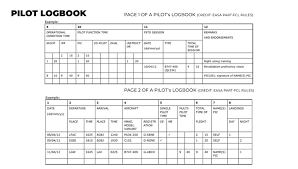
Understanding how to fill in a flight logbook UK correctly is fundamental to your aviation career and licence validity. Your logbook serves as the official record of your flying experience, and errors or omissions can create serious problems during licence applications, rating renewals, or employment checks. Whether you're a student pilot making your first entries or an experienced aviator looking to ensure compliance, getting your logbook entries right from the start saves considerable hassle later. This guide covers exactly what information to record, the correct format for entries, and the common mistakes that can invalidate your logged hours.
Why Accurate Logbook Entries Matter
Your flight logbook is more than a personal diary of your flying adventures. It's a legal document that the Civil Aviation Authority (CAA) and potential employers will scrutinise when verifying your qualifications. Every hour you log contributes towards licence requirements, currency obligations, and rating privileges. If your entries are incomplete, incorrectly formatted, or inconsistent, examiners may refuse to credit those hours towards your experience requirements.
The CAA has specific requirements for what constitutes a valid logbook entry, and airlines conducting background checks will examine your records meticulously. Discrepancies between your logbook and official records can delay job applications, require statutory declarations to correct, and in serious cases, raise questions about your integrity as a pilot. Taking time to maintain accurate records from your very first flight prevents these complications entirely.
Essential Information for Every Flight Entry
Each flight entry must contain specific pieces of information to be considered valid. The CAA requires that your logbook shows the date of flight, aircraft type and registration, departure and arrival aerodromes, and the duration of the flight. Beyond these basics, you need to record the nature of the flight, your role as pilot, and any specific training or checks completed.
For the aircraft details, always record the exact type designation as it appears on the certificate of registration, not informal names or nicknames. The registration should be written in full, including the country prefix. For UK-registered aircraft, this means including the G- prefix before the four-letter registration. Using shortcuts or abbreviations here can cause problems when your hours are being verified.
The departure and arrival points should use official ICAO codes where these exist, or the full name of unlicensed airfields. Recording just "local" or "circuits" isn't sufficient — you need to show where you departed from and where you landed, even if it's the same aerodrome for a circuits session.
Recording Flight Times Correctly
Flight time recording causes more confusion than almost any other aspect of logbook keeping. The UK follows EASA rules on this matter, which means you should record flight time as the total time from when the aircraft first moves under its own power for the purpose of taking off until it comes to rest at the end of the flight. This is known as chocks-to-chocks or block time.
All times should be recorded in UTC (Coordinated Universal Time), not local time. This remains constant throughout the year regardless of British Summer Time adjustments, which prevents confusion and maintains consistency with flight plans and other aviation records. Record times in the 24-hour format, using hours and minutes separated by a colon.
When logging night flying hours, only record the portion of flight that actually takes place during the official night period. In the UK, night is defined as the period from 30 minutes after sunset to 30 minutes before sunrise. You may need to split a flight entry if it spans the transition between day and night flying.
Pilot Function Time Categories
Understanding the different categories of pilot function time is crucial for correct logbook entries. The main categories you'll encounter are pilot-in-command (PIC), co-pilot, dual instruction received, and flight instruction given. Each has specific rules about when it can be logged.
You may log pilot-in-command time when you are the sole manipulator of the controls, when you are acting as pilot-in-command of a multi-crew aircraft, or when you are designated as student pilot-in-command under the supervision of an instructor. For solo flights and flights where you are the only qualified pilot on board, the entire flight time may be logged as PIC.
Dual instruction time applies when you are receiving instruction from a qualified instructor. This time is logged in addition to any PIC time — so if you complete a solo exercise during an otherwise instructional flight, that portion would be logged as PIC while the rest remains as dual. For instrument training, separate columns exist for actual instrument time (flown in genuine instrument meteorological conditions) and simulated instrument time (using a view-limiting device in visual conditions).
Recording Instrument Flying and Simulator Sessions
Instrument flying hours require particular attention in your logbook. You must distinguish between actual instrument flying and simulated instrument flying, recording each in the appropriate column. Actual instrument flying occurs when you're operating solely by reference to instruments in instrument meteorological conditions. Simulated instrument flying uses screens or foggles in visual conditions to practice instrument procedures.
Flight simulation training device sessions also belong in your logbook, but they must be recorded separately from actual flight time. Your logbook should have specific columns or sections for simulator hours, and each entry needs to show the device type and qualification level. Not all simulator time counts towards licence requirements equally, so accurate recording helps track exactly which hours credit towards what.
If you're building hours towards an instrument rating or maintaining instrument currency, keeping these records precisely is essential. The examiner who signs off your rating will verify your logged instrument time against the requirements, and discrepancies will need explaining before they can approve your application.
Signatures and Verification Requirements
Certain entries in your logbook require verification through instructor or examiner signatures. All dual instruction entries should be signed by the instructor who gave the training. Skill tests and proficiency checks require the examiner's signature, along with their licence number and the date. Solo flights during training should be authorised and countersigned by your instructor.
For self-authorised flights once you hold a licence, no signature is required for routine entries. However, you should sign your own entries periodically — at least at the end of each page — to authenticate your records. Some pilots sign every entry as a matter of good practice.
If you notice an error in an entry that's already been signed, never use correction fluid or attempt to completely erase the mistake. Draw a single line through the incorrect information, write the correction nearby, and initial and date the change. This maintains the integrity of your records and shows transparency rather than any attempt to deceive.
Running Totals and Page Transfers
Maintaining accurate running totals is as important as the individual entries themselves. At the bottom of each page, you should total all the columns and carry these figures forward to the top of the next page. These running totals allow you or anyone reviewing your logbook to quickly verify your total experience in various categories.
When transferring totals, double-check your arithmetic. A simple addition error that goes unnoticed can compound through subsequent pages, eventually creating a significant discrepancy between your claimed hours and the actual entries. Some pilots use a calculator for every total; others reconcile their logbook against digital records periodically.
If you're starting a new logbook, you'll need to transfer totals from your previous one. Record these as a single line entry showing "Totals brought forward from previous logbook" with all the relevant figures. Have this entry signed by an instructor, examiner, or CAA-authorised person who has verified it against your old logbook.
Common Mistakes That Can Invalidate Hours
Several recurring errors cause pilots problems with their logbook records. Forgetting to record flights at all is surprisingly common, particularly for short local flights or circuits sessions. Making entries immediately after each flight, or at least the same day, prevents this lapse.
Using incorrect aircraft type designations, recording local time instead of UTC, and failing to obtain instructor signatures are other frequent issues. Some pilots log more hours than they're entitled to — claiming PIC time when they were actually receiving instruction, for example — which can have serious consequences if discovered.
Inconsistent entries also raise red flags. If your handwriting, pen colour, or entry style changes dramatically from one page to the next, or if there are unexplained gaps in dates, reviewers may question the authenticity of your records. Maintaining consistency throughout your logbook demonstrates professionalism and reliability.
Frequently Asked Questions
Can I use a digital logbook instead of paper?
The CAA accepts electronic logbooks provided they meet certain requirements, including the ability to produce printed records that contain all mandatory information. You should be able to demonstrate the integrity of your digital records and have a backup system in place. Many pilots maintain both digital and paper records for security.
What happens if I lose my logbook?
If your logbook is lost or destroyed, you'll need to reconstruct your flight history from other sources such as club records, aircraft technical logs, and your flying school's records. You may need to make a statutory declaration about the loss and have the reconstructed entries verified by appropriate authorities. This underscores why keeping copies or digital backups is sensible.
Do I need to log every flight forever?
Yes, you should maintain your logbook throughout your flying career. Even once you've accumulated far more hours than needed for your current licence, your records may be required for future applications, employment verification, or insurance purposes. Many professional pilot positions require applicants to produce their complete flight history.
Can I count flight time as a passenger towards my experience?
No, only time when you are operating as a pilot counts towards your logged experience. Simply being on board an aircraft as a passenger, even in the cockpit, does not qualify as loggable flight time. The only exception is familiarisation flights for specific type ratings, which have their own rules.
Should I log overseas flights differently?
Flights conducted overseas are logged in the same manner as UK flights, using UTC for times and ICAO codes for aerodromes. If you're flying on a foreign licence or in aircraft with different registrations, ensure you record these accurately. Hours logged on foreign licences generally count towards UK requirements, but verification may be needed.
Key Takeaways
- Record every flight immediately with the correct date, aircraft type and registration, departure and arrival aerodromes, and flight times in UTC.
- Use the chocks-to-chocks method for recording flight time and maintain separate columns for different categories of pilot function time.
- Obtain instructor and examiner signatures for all training and test entries, and countersign solo flights during training.
- Never use correction fluid — cross through errors with a single line, correct nearby, and initial and date all changes.
- Maintain accurate running totals at the bottom of each page and verify transfers carefully when starting a new logbook.
- Keep your logbook secure and consider maintaining digital backups, as reconstructing lost records is difficult and time-consuming.